The first major update for TVPaint Animation 12 is here! There is a lot to go over, so here are the new features and bugfixes.
What’s new in TVPaint Animation 12.1.0?
Timesheet:
- Use the new Timesheet Panel to help you plan your animation and track its progress.
- Japanese and Occidental layouts are available.
- Add information in the Memo Panel, visualize audio tracks waveforms, add dialog notes and review camera shots in the dedicated columns.
- Roles can be added to frames (Keyframes, Breakdowns, Inbetweens, Special Inbetweens), mapped to specific Image Marks. You can also flip between roles.
- New Keyframes sharing the name of an existing Keyframe will have their content automatically match the existing one.
- Japanese CELL column is automatically updated according to the Inbetweens' status (To Do / Done).
- The Timesheet can be exported in PDF and XDTS.
- XDTS data can be imported in TVPaint to create or update a Timesheet.
- More information can be found on the Documentation page
Search Engine:
- The Search Panel has been revamped.
It can now search elements in Brushes, Custom panels, Shortcuts, Clips, Layers, Library or even Projects, and select them:
- The Documentation button in the Main Panel has been changed: now it opens a search bar for the online Documentation :
SDK:
- The SDK has finally been updated, and revamped.
To access it, go to this link:
Timeline:
- Pre and Post Behaviour have been added for the Layer Folder:
- If you choose a Pre/Post behavior on the folder, it overrides the layer Pre/Post behaviors.
- If you choose Pre/Post behaviors on the layers, there is no Pre/Post behavior on the folder.
- A loop function has been added to the Timeline:
- Shift click on the top of the Timeline will allow you to select a range of frames and will turn the loop button on automatically.
- When loop mode is on and a selection has been made: playback will loop between those two sections.
- When loop mode is on and a selection has been made: pressing the next instance shortcut on the last frame will take you back to the first frame of the selection (for example, when doing straight ahead animation).
- Turning loop mode off will grey out the loop mode button and the selection. You will then quit loop mode, and both playback and instance navigation should go back to normal.
- The last selection is remembered for a later use. Should the loop button be turned back on (by clicking on it) without creating a new selection, the last selection should then be active.
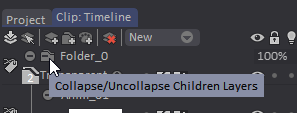
- New icon has been added for collapsing folders:
- A new "Fit to Mark In/Out" Zoom option has been added in the Timeline.
- Framecount on instances is now displayed even if a layer is locked or collapsed.
- You can now move an entire Folder in the Timeline.
- Collapsed Folder now has the same color as its color group.
- Layer Attenuation should be active while playing the animation.
- Added a "Clear all Bookmarks" and a "Clear selected Bookmarks" options in the Bookmarks sub-menu.
- Clicking on the current frame now selects it.
- Audio tracks can once again be moved before the timeline starting frame.
Storyboard:
- A basic Onion Skin view named "Bridge Between Clips" has been added in the Timeline view. It can be activated from the Light Table Panel and will let you see the last frame of the previous Clip and the first frame of the next Clip.
- A scrollbar has been added in Project View -> Column View.
- In the Storyboard view, you can now correctly stretch clip duration.
- Improved the experience when writing text in the Action/Dialogue/Notes fields: better returns to line, undos working, cursors refreshing.
Camera:
- New type of Camera key movement are available, matching the Japanese common camera moves:
- The following actions can now be assigned to a shortcut:
- Next Camera key.
- Previous Camera key.
- Go to first Camera key.
- Go to last Camera key.
Library:
- You can now store sounds in the Library!
- Sound in the Timeline can now be imported from the Library
- Elements can now be sorted by creation date and alphabetical order
Rigging:
- You can now save and import a full rig into the Library (so a character with all its bones already placed, with the correct dependencies), and even an animated one.
- A pose selector with preview has been added to the Rigging Tool:
- Light table is now available for rigging layer.
- Constraints have been added to bones.
- Blocking/Unblocking a bone is now an undoable action.
- You can now Transform and/or Duplicate Puppet Layers into Animation Layers.
- You can now scale each member in both directions.
- You can now export a selection of images/folders, instead of the entire Library only.
- You can now add and remove members, even if the rig/animation is already done.
Interface:
- You can now have up to 3 Color Panels opened at the same time:
- Camera view setting is now unique to each Project view
- HUD squares (Camera and FX for example) size have been increased.
- Line Smoothing's HUD is now the opposite color as the place it appears.
- TVPaint now correctly opens when Iconified before closing.
Export:
- The official Apple ProRes export codecs are now available on the 3 OS for TVPaint Animation and the TVPaint Converter.
They replace the FFMpeg-ProRes export. - Audio tracks can now be exported from Clip: Display when loaded from Project View.
CTG Layers:
- Added "Extract with AntiAliasing" and "Deactivate CTG Layer" options in the Layer Preset Panel.
FX Stack:
- FX Preview should now be applied to all the layers.
George:
- George Commands for the Timesheet have been added:
- tv_LayerRoleSet iLayerID iFrame iRole
iRole can be:
0 : None
1 : Keyframe
2 : Inbetween Guide
3 : Inbetween
4 : Completed Inbetween - tv_LayerRoleGet iLayerID iFrame
return oRole
oRole can be:
0 : None
1 : Keyframe
2 : Inbetween Guide
3 : Inbetween
4 : Completed Inbetween - tv_TimesheetExportXDTS iPath iData[iLayout]
iPath being the export path
iData being the data to export: 1 for Action, 2 for Cell
iLayout can be: 1 for Japanese, 2 for Occidental. If no parameter is given, Japanese layout will be exported by default
- Added a George command to transform an Anim Layer into a CTG Layer:
tv_TransformIntoCTG iLayeriLayer : the ID of the Anim Layer into a CTG Layer. - Added a George command to transform a CTG Layer into an Anim Layer:
tv_CTGTransformIntoAnim iLayeriLayer : the ID of the CTG Layer to transform into an Anim Layer.
- Added George commands to handle CTG Palettes.
Please note that Exclusion color is always excluded when checking for position. - Get the palette at a given position:
tv_GetCTGPalette iLayerID iPositionreturns oR oG oB oNameiLayerID: the CTG layer's IDiPosition: the position in the paletteoR: R valueoG: G valueoB: B valueoName: Name of the Color - Add the A Color with an optional name in the palette:
tv_CTGPaletteAddAColor iLayerID [iName]iLayer: the CTG layer's IDiName: the optional color name - Get Exclusion color values:
tv_GetCTGPaletteExclusion iLayerIDreturns oR oG oBoR: R valueoG: G valueoB: B valueiLayer: the CTG layer's ID - Set Exclusion color values:
tv_SetCTGPaletteExclusion iLayer iR iG iBiLayerID: the CTG layer's IDoR: R valueoG: G valueoB: B value - Delete the color at given position from the CTG palette.
tv_DeleteCTGPalette iLayerID iPositioniLayerID: the CTG layer's IDiPosition: the position in the palette - Set the color and name at given position from the CTG palette.
tv_SetCTGPalette iLayerID iPosition iR iG iB [iName]iLayerID: the CTG layer's IDiPosition: the position in the paletteiR: R valueiG: G valueiB: B valueoName: Name of the Color
- A command to check for unsaved changes has been added:
tv_ProjectCheckUnsavedChange
"Close the project found with given ID. If no ID is given, close the current project. Does nothing if given ID is incorrect."
Parameter : ProjectId, string, "Id of the project to check for unsaved changes. If incorrect, get the current one."
return : "Return true if the project has unsaved changes."
error : "Can't get project/Too much argument"
- A command to test if APen or BPen color is active has been added:
tv_checkactivepen
"Check which pen is currently active"
return : "The pen which is active"
- Add a George command to calculate matrix data for tv_PixelMatrix & tv_CustomMode:
tv_ComputeMatrix iR iG iB
iR: R value of the color
iG: G value of the color
iB: B value of the color
Returns:
oR: The first value to use in the last line of tv_PixelMatrix and tv_CustomMode.
oG: The second value to use in the last line of tv_PixelMatrix and tv_CustomMode.
oB: The third value to use in the last line of tv_PixelMatrix and tv_CustomMode.
oA: The fourth value to use in the last line of tv_PixelMatrix and tv_CustomMode.
Note that the last value of the matrix passed in tv_PixelMatrix and tv_CustomMode should always be 0.
General:
- Added v11's Legacy AA algorithms for Custom Brushes only.
- Added a Transformation Preview Quality option on the Preferences panel (in the Drawing section).
- Added a checkbox to ignore autobreak on all Transformation tools.
- Added an option to load an image to be an icon for an action in a Custom Panel.
Keep in mind that the image will be shrunk down to fit in the button. - You can now preview the Transform Tool to all layers when the option is selected.
- You can now move the Light Table's pivot point center.
- You can now apply Panning to multiple layers.
- You can now switch between frame / time count in the Slate window.
- A warning pop-up now shows up when an imported audio file's sample rate differs from TVPaint's.
- A warning pop-up has been added when applying transformation on single frame color group.
- A confirmation pop-up now shows up when deleting a profile curve.
- An "Apply on: all frames of current group" option has been added for the Transform Tool.
- Eraser Tool is now set to Hard instead of Soft by default.
- Perspective Tool preview can now be applied to all layers when option is selected.
- When using a clean configuration, the Animator Panel will now be present in the left drawer, below the Tool Panel.
- When assigning a shortcut to a layer preset, the preset is now already selected when opening the shortcut panel.
- When loading a project, the project's zoom ratio on the Timeline will be used instead of the default one.
- On a new configuration, Line Smoothing is now in "Real Time" mode.
Shortcuts:
- Panning, Zoom and Rotation can now be assigned to any key (instead of being only on Alt).
What has been fixed and/or improved in TVPaint Animation 12.1.0?
Timeline:
- Layer folder GUI is now correctly updating the exposure changes.
- Removed empty space in Camera Layer.
- Fixed visual glitches on collapsed colored folders.
- Fit to Mark In/Out option is back.
- There should no longer be artifacts when scrolling Project View.
- CTG layers content will now correctly appear when previewing a Folder.
- Deleting config.ini file no longer causes timeline window to be undocked.
- Fixed a preview issue in Project view when clips have camera with different sizes.
- Fixed a loss of focus when duplicating clips.
- Fixed a lag that could happen after modifying Layer attenuation.
- Fixed an issue causing more frames to be deleted when deleting selected frames on a CTG layer.
- Fixed an issue preventing the Layer: Clear function from working as it used to be in v11.
- Fixed an issue preventing CTG layers of a duplicated clip from working.
- Fixed an issue that could prevent selection of multiple layers
- Fixed an issue that could prevent the Timeline from being undocked.
- Fixed a crash that could happen when deleting the selected current layer.
- Fixed a crash that could happen after moving the Timeline in another workspace and restarting the software.
- Fixed a crash that could happen when selecting a Folder as a CTG source.
- Fixed a crash happening when greatly reducing the zoom factor in the Storyboard Timeline view.
- Fixed a crash that could happen when moving a layer with a shortcut if the Timeline was hidden.
- There should be fewer crashes when deleting layers.
- Using Split Clip on the first frame of a layer no longer causes a crash.
- Cut selection to new layer inside layer folder no longer causes a crash.
- [Standard Edition] Fixed a Preview refresh issue when selecting Clips.
Camera:
- Camera coordinates are now correctly kept after using Crop Tool.
- Camera overlay now shows again when creating the Camera layer.
- Fixed missing texts in the History window on the camera profiles and tool profiles.
- Fixed an issue preventing you from moving camera frames.
- Fixed a crash that could happen when switching to project with camera.
Rigging:
- Lots of optimisations have been done to improve performance.
- Bone creation can no longer be undone.
- Hiding a layer while in Rig mode no longer shows only the HUD only.
- There should no longer be a gap between border and bone.
- If there are only Puppet layers on the project, an empty Anim layer will no longer be created.
- Improved performance by reducing refresh times when switching modes, adding a member, creating a rig from a file or animation.
- Popups should no longer appear after deleting items in a Rigging Folder.
- Some options are no longer available on Puppet Layers: duplicate and cut.
Pasting on an already existing Puppet Folder is also no longer possible. - Fixed an issue where rigging bones were gone from the user interface.
- Fixed many pop-up issues when right-clicking on a Puppet Layer in the Timeline.
- Fixed missing texts in Window history for Rigging actions.
- Fixed a crash that could happen when closing the software when a Puppet Layer is selected.
- Fixed a crash that could happen when cloning a profile.
- Fixed a crash that was happening when creating an Anim save file.
Light Table:
- Greatly reduced lag when Light Table with Out of Pegs is active on high dimensions projects (>4K).
- Fixed position issues with Light Table when Multi-Screen panels option is deactivazted.
- Fixed empty spaces in the Light Table GUI.
- Hitting Escape correctly puts back the old color in the Light Table.
- Text of the Out Of Pegs correctly appear in scale 2.
Interface:
- Added fields for Angle and Pivot in Crop Tool.
- Show Full Page option no longer blocks the software when trying to close it.
- Minislider value no longer increase by a lot when using a stylus.
- Timeline is once again undockable in non Multi-Screen mode.
- Brush bin has been added back.
- George scripting window can be resized once again.
- Fixed a scaling issue when using the scrollbar in the Project tab.
- Texturizer panel size has been reduced.
- Images can once again be selected in the Texturizer panel.
- Added a missing parameter (Y4) in Perspective Tool.
- In the Light Table, the Edit Color Group panel now correctly opens when selecting Image Mark > Edit.
- When opening the software with a new configuration, canvas size will correctly be resized to the main window.
- Fixed an issue where panels were buggy when they were outside the software, if one monitor had a different resolution than the other one(s).
- Fixed an issue resulting in a wrong canvas size when using a fresh config.
- Fixed graphical glitches in the Shortcuts panel.
- Fixed graphical glitches in the Undo panel.
- Fixed some panels not correctly scaling in scale 1.5 or higher, like the Export Parameters one.
- [Windows] Fullscreen mode is back and working as intended.
Storyboard:
- Fixed issues with publish paths.
- Improved the experience when writing text in the Action/Dialogue/Notes fields: better returns to line, undos working, cursors refreshing.
- Fixed a crash that could happen when scrolling audio in the Timeline.
- Fixed an issue where sound wasn't present after exporting with the Split Scenes option checked.
Papers:
- Made changes in Paper panel to prevent having papers with the same name.
- Papers are now correctly recalled after selecting a Camera Layer, then an Anim Layer.
- Dual Paper brushes are now correctly recalling their blending mode.
- Dual Paper is no longer active despite recalling single-paper brush.
- When adding a Paper to a brush, right-click for Erase will now work once again.
FX Stack:
- The keys of the FX Stack are now frame-based and not time-based.
- If "Preview" is checked on the FX Stack, playback will now correctly pause when hitting the pause button.
- FX Stack is no longer usable on Puppet Layers.
George:
- tv_RNGInt and tv_RNGDouble no longer return ERROR when running the command.
- tv_LayerRename no longer renames the layer in "Anim_0".
- The "silent" argument of tv_LoadProject will now also ignore a warning when a Guide:Image reference is not found.
- Fixed a crash that could happen when using the tv_grab and tv_SaveMode commands.
- Fixed an issue where the pattern and allimages parameters of tv_ClipSaveStructure weren't working properly.
General:
- Improved performance with very high dimensions projects (> 4K).
- Hundreds of localisation errors and mistranslations in the four languages have been fixed.
- Crop Hud now snaps correctly.
- Cut brush (freehand + polygon) now correctly follows its AntiAliasing settings.
- Selection Tool : "Cut to Layer" correctly remembers frame disposition.
- Tutorial Recorder now correctly records the screen.
- The software will display a warning when a filename is too long.
- Interface: Toggle L+R Drawers should now correctly work.
- Stamp in Place no longer moves the brush.
- The software no longer uses the first export dimensions settings for a project indefinitely.
- Show Full Page no longer prevents playback if "Play with camera view" is enabled.
- PSD files exported with Visible Layers option should now correctly be recognized by Photoshop.
- There will no longer multiple Undos when duplicating a clip containing Image Marks.
- The "Acrylic 3" custom brush no longer lags. You will however need to reset your configuration to see this.
- Follow Camera button of the Remote now works once again.
- Applying the Perspective Tool no longer puts you back to the first frame of the layer.
- Fixed a lot of focus issues related to Subpixel option when Modular Windows is enabled (e.g. loss of right click, unmovable panels...)
- Fixed Transform Tool "All layers" preview.
- Fixed still transformation differences between Edit brush and Custom brush.
- Fixed memory leaks in various places (deleting FXs for example...)
- Fixed some graphical glitches with Perspective Tool.
- Fixed EDL publish.
- Fixed an issue where files saved in a previous 12.0 version were not be able to be opened in the Standard Edition.
- Fixed a loss of focus on TVPaint's main window during playback.
- Fixed a graphical glitch with the padlock in the Export Panel.
- Fixed a lag that was happnenig when playing after modifying layer attenuation.
- Fixed a broken link to the Store in the Demo version.
- Fixed a refresh issue when drawing on the canvas.
- Fixed an issue where sound wasn't present after exporting with the Split Scenes option checked.
- Fixed an issue where accents were replaced by other caracters in PSD export.
- Fixed an issue where webcam was not working correctly if a project had more than one clip.
- Fixed an issue where saving a project as a template could not work correctly.
- Fixed an issue where Warp Tool wasn't correctly working with selection
- Fixed an issue causing the "Cycle between actions" shortcut to be duplicated when quitting TVPaint.
- Fixed a crash that was happening when using Pan or Transform Tool outside of the range of the Folder.
- Fixed a crash that could happen when duplicating a project.
- Fixed a crash that could happen when turning Proxy off and Layer Attenuation on.
- Fixed a crash that could happen after using the Perspective Tool several times in a row.
- Fixed a crash that could happen when using the "Split Clip" function two times in a row.
- Fixed a crash that could happen when deleting Selection with Perspective Tool in Fill Mode.
- Fixed a crash that happened when trying to open a 0 byte file with TVPaint.
- [Windows 11] Fixed an issue preventing AVI files from opening correctly in TVPaint Animation.
macOS:
- Performance has been greatly improved on macOS Tahoe.
- Using escape on a sticky text panel (like when renaming a layer) should now correctly work again.
- Fixed text field issues in the Slider Color Panel
- Fixed "ghost" popup windows in multi-panels mode.
- Fixed some artifacts on mini-sliders.
- Fixed various TabletProximity events not correctly received by TVPaint and preventing from using Eraser while drawing.
- Fixed issues on some tooltips where a blue line was sometimes appearing.
Converter:
- Fixed crashes happening when filenames contain non ascii character (Unix system with Windows clients)
- Duplicated dependency filepath are no longer uploaded.
- Fix random crashes when uploading several files.
Shift click on the top of the Timeline will allow you to select a range of frames and will turn the loop button on automatically.
When loop mode is on and a selection has been made: playback will loop between those two sections.
When loop mode is on and a selection has been made: pressing the next instance shortcut on the last frame will take you back to the first frame of the selection (for example, when doing straight ahead animation).
Turning loop mode off will grey out the loop mode button and the selection. You will then quit loop mode, and both playback and instance navigation should go back to normal.
The last selection is remembered for a later use. Should the loop button be turned back on (by clicking on it) without creating a new selection, the last selection should then be active.
Update from your user account